Maintaining Momentum in Expert Workflows with Offset
Company
Bluebeam
Role
Senior Designer
Timeline
12 weeks
Released
March 2026
The tool
Bluebeam Revu is a PDF-based collaboration and markup tool designed for the architecture, engineering, and construction (AEC) industry. It helps users create, edit, annotate, and share project documents.
The business need
Support advanced workflows and generate revenue with Bluebeam’s new Max tier.
Offsetting markups by distance was identified as a high-value capability.
The challenge
How might we introduce a powerful geometry manipulation tool while preserving the momentum of expert workflows?
Who are our users?

Andrew, an estimator
Expert Bluebeam Revu users who evaluate construction drawings to measure quantities, perform digital takeoffs, and calculate costs that inform accurate bids.
This project began with a proof-of-concept developed by one of our lead engineers. While the concept validated the feasibility of the feature, I intentionally stepped back from the implementation to ensure we were solving the problem from a user workflow perspective, not just a technical one.
Through interviews with estimators and engineers who regularly use both Bluebeam and AutoCAD, a pattern emerged:
Users already had strong mental models for how offsetting should behave.
Insight 🧠

AutoCAD-like behavior is expected.
“People are expecting when they're using offset that it behaves exactly like AutoCAD.”
Insight 🧠
Offset geometry should inherit styling.
“If I had a red square with a blue infill, the offset keeps that unless I change it.”
Thinking About Context
The initial proof-of-concept followed a familiar UI pattern.
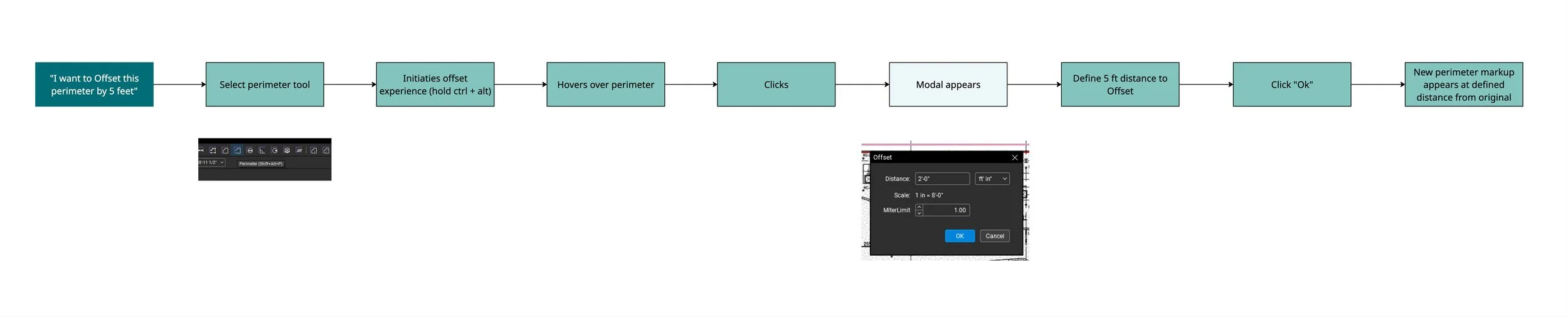
While functional, this approach introduced a problem: in complex expert tools, interruptions matter.
Modals are intentionally disruptive. They pause the user's workflow and demand attention.
In an expert workflow, modals break context.
Users must shift their attention away from the drawing, enter information elsewhere, and then reorient themselves when returning.
Optimize for Momentum
Momentum is productivity. Design to keep users moving forward without unnecessary friction.
Exploring Solutions
I began exploring whether we could mirror an interaction already familiar to Revu users: sketch-to-scale input.
Instead of pausing the workflow with a modal, users could define offset distance directly within the drawing interaction.
A Moment of Tension
The feature already supported something powerful: users could offset a markup as a different type of markup. For example, offsetting an area measurement as a perimeter.
When I shared my initial direction with the lead engineer, he raised a concern.
If we simplified the workflow too much, we risked losing that flexibility.
We were at a crossroads.
Option A: Prioritize Simplicity
Always mimic the existing markup’s properties and type, simplifying the experience.
Option B: Preserve Full Power
Give them more power in choosing markup types, but interrupt their experience.
...after losing sleep thinking about balancing these two ideas...
The Breakthrough 💡
A question emerged…
What if offsetting wasn't just an action? What if it was a mode?
In Revu, markup tools like polygons and areas already operate as modes. Each mode determines what the left mouse click produces.
If offsetting behaved the same way, we could leverage an existing interface element that expert users already rely on.
Meet the Dynamic Properties Toolbar💡
An existing interface element used to manage the properties of each mode.
The Solution
Maintains Context
Distance input happens via keyboard without a required mouse move off the canvas.
Preserves Momentum
No modal interruptions in the workflow.
Exposes Power
The DPT makes markup conversion visible and adjustable.
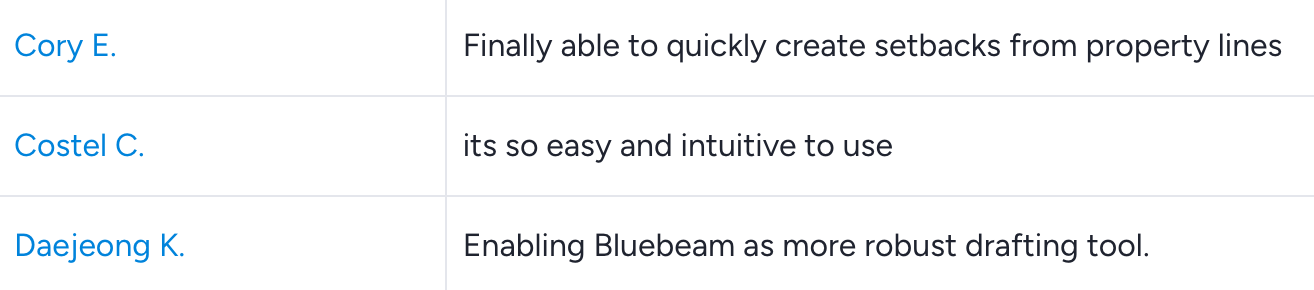
What beta users had to say




Outcomes
Delivered a high-value feature for Max-tier users
Offset launched successfully in the March 2026 release, supporting Bluebeam’s advanced workflow strategy and helping drive adoption of the Max subscription tier.
Raised beta user satisfaction by 28.6%
Through multiple rounds of research and iteration, user feedback scores increased from 3.5 to 4.5, signaling strong alignment with expert Revu workflows.
Reflection 🫱🏼🫲🏽
Offsetting is one of those features that feels obvious once you see it working.
But reaching that simplicity required navigating tension.
In the end, the solution worked because it embraced that tension rather than avoiding it.
This project was yet another reminder that sharing early thinking with engineers often accelerates convergence because constraints and opportunities become clearer.